MicrosoftRewardsWebsite
Search automatic rewards
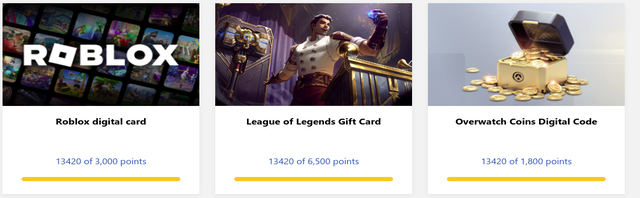
Get the most out of your Microsoft rewards account and earn points every day!
If you like the extension, please give it a star on GitHub! 
Download
If you enjoy the extension, 5-star rating would mean a lot:) 
Donate 
Donations help me make tools like this for free in my spare time. Any amount helps! ❤️

Features
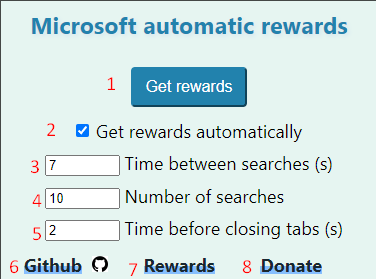
- Open 10 random tabs in Bing and close them once they are loaded.
- Automatically open tabs every day when the browser is opened (turned on by default).
- Choose duration between tabs opening in seconds (choose 0 to open all tabs at the same time).
- Number of searches
- Time in seconds before tab gets closed (choose 0 to close when loaded)
- GitHub page with code and documentation
- Visit the Microsoft Rewards site and log in.
- Donate with PayPal or any credit card.
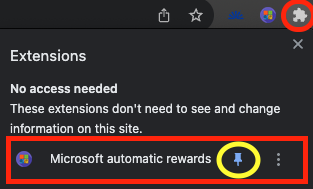
Make sure to pin the extension.
Project structure
The browser extension is built with WXT and React. One codebase produces both the Chrome (MV3) and Firefox (MV2) builds — there is no longer a separate source tree per browser.
/wxt                        - Browser extension (WXT + React + TypeScript)
  /entrypoints
    background.ts           - Background service worker entry
    /background             - Daily rewards, scheduling, search runner
    rewards.content.ts      - Content script on rewards.bing.com
    bingResult.content.ts   - Content script on Bing search results
    /popup                  - Popup UI (React)
    /components             - Shared React components
    /hooks                  - React hooks (storage, search progress)
    /utils                  - Search, progress, settings, helpers
    /data                   - Search term pool
    /enums, /types          - Shared TypeScript definitions
  /public                   - Static assets copied into the build (icons)
  wxt.config.ts             - Manifest and build configuration
/microsoft_rewards_app      - Android app (Flutter)
/assets                     - Source icon artwork (icon.svg)
/scripts                    - Maintenance scripts (icon rasterization)
/docs                       - Documentation and README images
Development
All extension commands run from the wxt directory:
cd wxt
npm install

npm run dev              # Chrome, hot reload
npm run dev:firefox      # Firefox, hot reload

npm run compile          # TypeScript typecheck
npm run test             # Unit tests (Vitest)

npm run build            # Production build -> wxt/dist/chrome-mv3
npm run build:firefox    # Production build -> wxt/dist/firefox-mv2
npm run zip              # Packaged zip for store upload
npm run zip:firefox
Build output lives in wxt/dist and is not committed — releases are
published to the web stores and to GitHub Releases.
To load an unpacked development build: run npm run build, then in Chrome open
chrome://extensions, enable Developer mode, and “Load unpacked” from
wxt/dist/chrome-mv3.
Legacy code
Versions before the WXT rewrite used hand-written chrome/ and firefox/
source trees with committed compiled output. That code has been removed from
the default branch and preserved on the legacy
branch. Nothing on the default branch depends on it.
Contact
If you have any suggestions or questions, you can contact me at spin311pro@gmail.com.
Enjoy your rewards! 😊